If you’ve ever wondered “What is an advantage of using a raster graphic?“, the answer is that it can produce highly detailed images.
Raster graphics—also called bitmap images—are digital images made up of thousands (sometimes millions) of a rectangular array of tiny colored squares called pixels. You see them every day in product photos, advertisements, web design, and online visuals. Meanwhile, vector graphics represent images using mathematical equations and often have smaller file sizes.
Inpackaging design, raster format graphics are often used for high-resolution photos, highly detailed graphics, complex textures, and realistic images. Each pixel holds its own color and brightness information, which is why raster images can display realistic shading and subtle details.
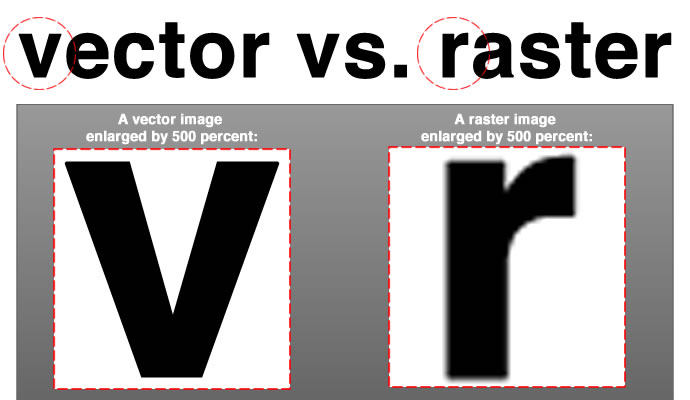
The only catch? Raster graphics are resolution-dependent, meaning the image quality, file size, and sharpness depend on how many pixels are packed into the image. They tend to lose resolution when enlarged. For packaging, that means starting with high-resolution files to keep everything crisp in print.
Here are the basic characteristics of raster graphics.
Pixel-based: The image is essentially a mosaic of colored squares.
Resolution-dependent: Enlarging beyond the original resolution leads to pixelation.
Wide color range:What is an advantage of using a raster graphic? Well, it supports millions of colors, which is perfect for displaying subtle gradients and photographic detail.
Versatile formats: Commonly saved as JPEG, PNG, TIFF, PSD, or BMP
In the design world, images are classified under two major types: raster graphics and vector images, also known as vector graphics. The main difference between the two is what they’re made of.
If raster images are made up of pixels, a vector image is made of mathematical equations in disguise (a.k.a. vectors). Yes, math—like formulas that describe points, lines, and shapes that form an image.
Vector files, on the other hand, can be scaled infinitely since they’re not stored as fixed pixels. They’re stored as mathematical instructions that tell the computer how to draw the image. Vector graphics provide the most precise and clear designs.
Although vector art designs are infinitely scalable without losing quality, raster formats are widely used in design and packaging due to their rich detail and ability to capture realistic, detailed textures and complex color variations in digital photography.
This is the advantage of using a raster graphic—its ability to portray intricate, nuanced visuals that vectors can’t match.
Key Features of Raster Graphics
Before we explore the strengths of a raster image in digital art, design, and packaging, it’s important to understand its features. As mentioned, raster images are built for detail, color richness, and realism—qualities that make them a staple in everything from product photography to high-end print materials.
1. Composed of Pixels, Allowing for Detailed Images
Every pixel contributes to the overall image detail. The more pixels per inch (PPI), the sharper the raster images appear, which is critical for high-quality packaging.
2. Supports a Wide Range of Colors and Shading
Raster files can display millions of colors and subtle gradient transitions, making them perfect for storing photos and complex, detail-rich images.
3. Common Raster Image File Formats Include JPEG, PNG, and GIF
You’ve likely come across raster files without even realizing it. If you spot any of the following file formats, you’re looking at a raster image:
JPEG: Great for photos; compressed but can lose quality
PNG: Supports transparency; lossless compression
TIFF: Preferred for print; high-quality, large files
PSD: Editable Photoshop files with layers
BMP: Uncompressed; large but rarely used today
Understanding the advantages and disadvantages of the main raster file types is crucial for effective design.
4. Used in Digital and Print Applications
Did you know that raster images, especially those in joint photographic experts group format, are well-suited for storing high-quality photographs taken from digital cameras?
Due to its characteristics, a raster image works well on everything from online store photos and business packaging to billboards. Just keep in mind that print requires higher resolution to stay sharp.
Advantages of Using Raster Graphics in Design
So what is an advantage of using a raster graphic? There’s a good number, actually. Raster graphics remain the preferred format in digital design because they convey texture, color, and lighting in a way that other formats can’t.
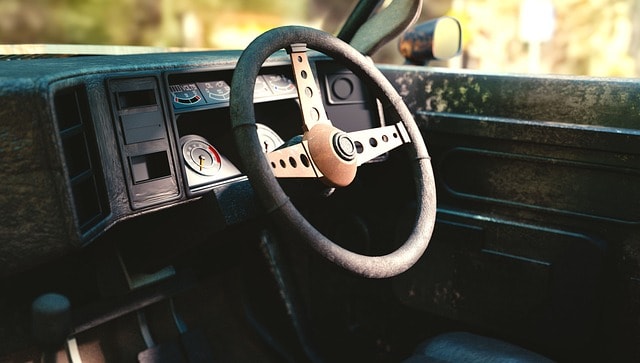
High Detail and Realism. Raster graphics excel at capturing intricate details. They can reproduce tiny elements, like the grain of wood, that give an image depth and authenticity.
Rich Color Depth and Gradient Effects. Supporting a vast color range, raster images can create smooth transitions and lifelike visuals. This is especially valuable for product photography, artwork, and any design requiring natural-looking tones.
Broad Software Compatibility. Raster files work seamlessly with popular editing programs like Adobe Photoshop, GIMP, and many other apps and design tools. That’s why they’re a versatile choice for professionals.
Easier Photo Editing and Manipulation. Because raster graphics are made up of individual pixels, designers can adjust each tiny element of an image without affecting the rest. This makes it easier to retouch product photos, correct colors so packaging looks exactly as intended, or apply branding effects like textures and shadows.
Widely Supported Across Digital Platforms. From websites to printed packaging and mobile displays, raster graphics are universally compatible, ensuring your designs look great everywhere.
What Are the Advantages of Using Raster Graphics in Packaging?
When you’re shopping, chances are your decision to buy is influenced by how the product looks. Since buyers respond strongly to visuals, the packaging needs to make a good first impression in order to make a sale. The advantages of using a raster graphic are the following:
Photorealistic Product Images. An advantage of using a raster graphic is that it can capture fine textures, subtle color shifts, and refined details that make product images look true to life. This realism helps customers imagine exactly what they’re buying, whether it’s the crisp surface of a snack wrapper or the glossy finish of a cosmetic bottle.
Customizable and Adaptable. Need to tweak a label for a seasonal promotion or adjust colors to match a rebrand? Raster files are easily editable, allowing designers to update packaging designs without starting from scratch. This flexibility saves time and ensures brand consistency across product lines.
Perfect for Printed Packaging. High-resolution raster images translate beautifully into print, making them ideal for labels, boxes, pouches, and promotional inserts. With enough pixels per inch, the printed result is sharp, vibrant, and professional-looking.
Enhanced Branding and Marketing Appeal. Eye-catching visuals can be the deciding factor between a customer choosing your product or a competitor’s. Raster files allow brands to present their products in the best light possible, allowing recognition and eventually, encouraging purchase.
Limitations of Raster Art (and How to Overcome Them)
Raster files are incredibly versatile, but they’re also made of pixels. So while there are advantages to using raster graphics, they also come with certain drawbacks. Understanding these limitations—and knowing how to address them—ensures you get the best possible results in both digital and print projects.
1. Loss of Quality When Scaling
Unlike vector graphics, raster images can’t be resized indefinitely without losing sharpness. Enlarge them too much, and they become blurry or pixelated.
Solution: Always work with high-resolution images from the start, especially for print projects. When possible, use a hybrid approach: creating the main artwork in vector form, then incorporating raster elements for textures or photo realism.
2. Large File Sizes
The primary disadvantage of raster images is their large file sizes compared to vector graphics.High-resolution raster files, especially those with rich color depth, can be huge due to the massive pixel density. This makes them slower to load online or more cumbersome to store and share.
Solution: Optimize files for the intended platform, especially for web images, to ensure they load quickly and retain quality. For web use, apply lossless compression or export in efficient formats like graphics interchange format (GIF), JPEG, or PNG to balance quality and speed. For print, store the master file at full resolution, then create smaller, optimized versions as needed.
3. Not Ideal for Simple Logos or Illustrations
Logos, icons, and flat illustrations are often better in vector format, which keeps them crisp at any size. Raster graphics can work, but scaling issues and larger file sizes may make them less practical.
Solution: Use raster graphics for detailed, textured elements within a design, but keep core brand marks in vector format. This way, you get the best of both worlds: scalability and detail.
Raster and Vector Graphics: When to Use Each
Raster and vector graphics both exist because they’re useful for different kinds of projects. Some designs, like prints, are better with raster graphics, while graphics like logos are better in vector form. For better image and print quality, here are the best ways to use both raster and vector images:
Raster for Photorealism, Textures, and Complex Colors. Perfect for product packaging, marketing materials, and designs based on photography. Raster graphics capture the subtle color differences, shading, and detail needed to make products look appealing. This is exactly the advantage of using a raster graphic—delivering images that feel authentic and true to life.
Vector for Scalability and Simple Designs. The main disadvantages of vector graphics are that they require professional design software and knowledge to create. However, they’re best for printing brochures, business cards, logos, icons, and typography-based packaging. Because vectors are built from mathematical formulas, they can be resized infinitely without losing sharpness—ideal for maintaining brand consistency across different formats.
Combining Both for Best Results. Many professional designs use a hybrid approach: raster images for product shots or background textures, and vector graphics for logos, text, and graphic accents. This ensures both stunning visuals and perfect clarity, whether for print or digital use.
FAQs on Raster Graphics
Why are Raster Images Better for Packaging than Vector Graphics?
An advantage of using a raster graphic when designing packaging is that you get realistic, eye-catching visuals that can capture fine details.
They can reproduce the fine textures of fabric, the shine on a bottle, or the gentle color transitions in a sunset—details that vector graphics can’t replicate as naturally. This level of photorealism makes products look more appealing and premium on shelves.
Can Raster Images Be Resized Without Losing Quality?
Not exactly. Raster images are made of pixels, so enlarging them too much can make them appear blurry or pixelated. For packaging, we always start with high-resolution files (usually 300 DPI or higher), so the design stays sharp at the intended print size.
Which Raster File Format Is Best for Printing Packaging Designs?
For professional packaging printing, TIFF is often preferred because it’s high-quality and lossless.
PNG works well for designs that require transparency, while high-resolution JPEGs can be used for certain print jobs where smaller file sizes are needed. Your print provider can advise on the exact format based on your packaging type.
How Do I Ensure My Raster Files Look Sharp on Packaging?
The key is to use print-ready resolution and appropriate file format—typically 300 DPI or higher—and to design at the actual size the packaging will be printed to ensure image quality. Avoid stretching smaller images to fit larger spaces. Our team ensures every image meets these standards before it goes to print.
Are Raster Files Compatible with Packaging Printing Techniques?
Yes! Raster graphics and Tagged Image Format File (TIFF) work with most packaging printing methods, including offset, flexographic, and digital printing.
Choose Experts for Your Branding
Beautiful packaging starts with beautiful artwork—and that means using raster graphics the right way. Even the most photorealistic design can fall flat if the resolution is wrong, the file format isn’t print-ready, or the artwork doesn’t match the packaging’s structure.
That’s where our team comes in. At Refine Packaging, we don’t just print your packaging. We guide you from the very first pixel to the final box. Whether you need help creating a high-resolution design from scratch, adapting your existing artwork for specialty finishes, or ensuring every file meets print specifications, we make the process seamless.
Already have your artwork? Our Artwork Guidelines make it easy for you or your designer to submit a print-ready file. We’ll check every detail to minimize revisions, speed up production, and deliver packaging that looks as sharp in customers’ hands as it does on screen.
Let’s create packaging that stops shoppers in their tracks. Contact us today to connect with our design team and get started.
Asif Muhammad is a Co-Founder and Partner at the custom packaging box company, Refine Packaging. Recognized as a recommended packaging firm by Shopify and 99designs, thousands of companies nationwide choose Refine Packaging for their custom boxes and wholesale product packaging needs – including T-Mobile, Adidas, MetLife, Pandora, and Marriott Hotels. Asif’s leadership in the manufacturing industry stems from a mission to make the custom packaging process easier for businesses of all sizes. With 10+ years of packaging and engineering experience, Asif is uniquely suited to help companies think outside the box to create memorable retail packaging.








 Alex Jasin

 Amanda Jane Rivera
 Asif Muhammad
 Erica Campbell


.svg)
Share